
Xiaomi has officially released the HyperOS 4.0 update. If you want to install this new HyperOS 4.0 operating system on your Xiaomi, Poco, or Redmi device, you can install it in a few simple ways.
Before you begin, ensure that you have downloaded the correct HyperOS 4.0 ROM for your device and region. Do not install a ROM intended for a different model.
Method 1: Install HyperOS 4.0 from OTA Update
This is the easiest and safest method.
- Open Settings on your phone.
- Go to About phone.
- Tap Xiaomi HyperOS.
- Tap Check for updates.
- If HyperOS 4.0 is available, tap Download and install.
- Wait for the installation to finish and restart your phone.
You do not need to download any ROM manually with this method.
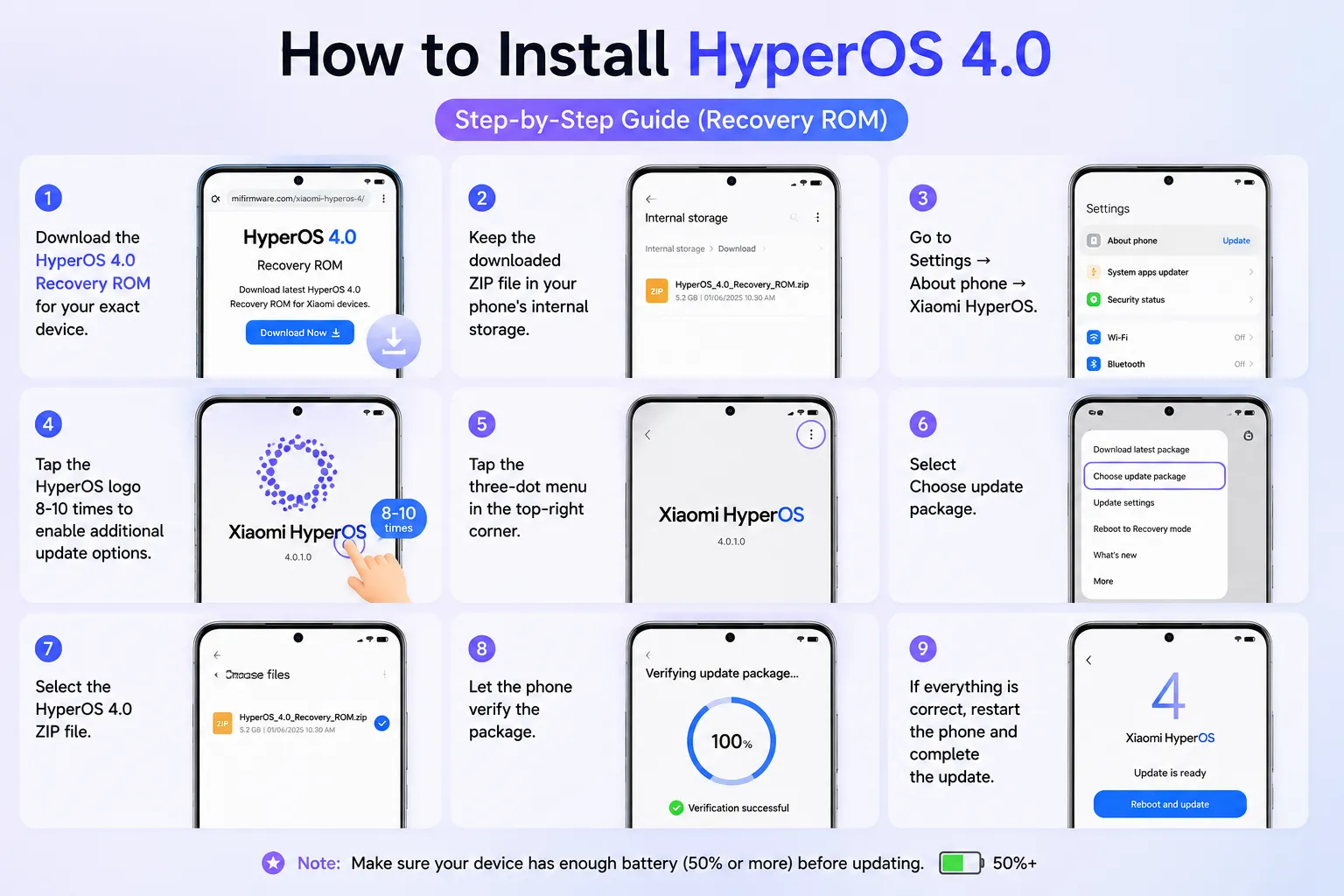
Method 2: Install HyperOS 4.0 using Recovery ROM
If the OTA update is not showing but the official recovery ROM is available for your device, you can try the manual update method.
- Download the HyperOS 4.0 Recovery ROM for your exact device.
- Keep the downloaded ZIP file in your phone’s internal storage.
- Go to Settings → About phone → Xiaomi HyperOS.
- Tap the HyperOS logo 8-10 times to enable additional update options.
- Tap the three-dot menu in the top-right corner.
- Select Choose update package.
- Select the HyperOS 4.0 ZIP file.
- Let the phone verify the package.
- If everything is correct, restart the phone and complete the update.
Do not extract the ZIP file before selecting it.
Method 3: Install HyperOS 4.0 using Fastboot ROM
Fastboot installation is mainly for advanced users.
- Unlock the phone’s Bootloader.
- Download the correct HyperOS 4.0 Fastboot ROM.
- Install the required Xiaomi flashing tool on a computer.
- Boot your phone into Fastboot Mode by pressing Volume Down + Power.
- Extract the ROM on your computer.
- Select the extracted ROM folder.
- Choose Clean All (recommended).
- Click Flash.
- Wait until the process is completed and restart the phone.
This method can erase your phone’s data, so take a complete backup before starting.